
What does PN360 show for a part number?
Your records
Stock with serials and locations, past RFQs and buyers, quotes, purchase and sales orders, supplier quotes and inbound emails that mention the part.
ILS data
Seller lists from your Parts Availability searches and the ILS market reports you have opened.
Engineering and regulatory layers
Directives, catalogue relations and fleet effectivity, where evidence exists for that part.
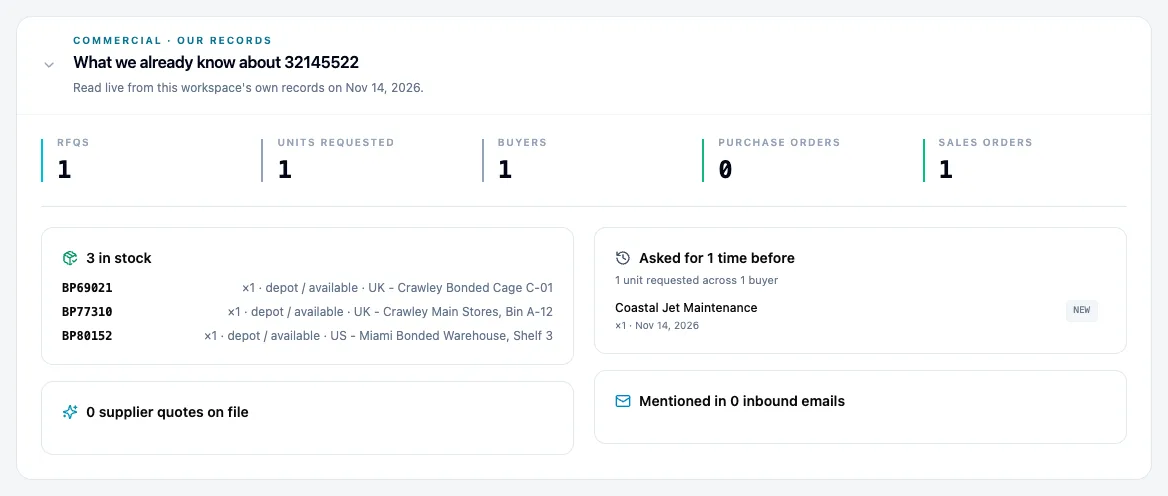
PN360 never blends its layers into one number; a layer with no evidence is shown as missing.
How does part history help you price a quote?
The RFQ in front of you is rarely the first time someone asked for that part. PN360 shows who asked before and how many units, what you quoted, what sold, and what suppliers offered. That is the context a trader usually keeps in their head or digs out of old emails.
How do you source a part you do not have?
Send one request to many suppliers
Market Search sends your RFQ to the suppliers you pick.
Replies are read for you
AI reads each reply and its attachments and matches it to the right request. Anything it cannot match goes to a review list.
Offers are ranked
Offers compete only within the same currency, part and price type. As-Removed and uncertified offers are never marked Best.
Turn the offer into an order
The chosen reply becomes a purchase order, or a quote to your buyer.
A supplier offer is only marked Best if you could buy it as it is; then price, condition, quantity and lead time decide.
Questions
Who can use PN360?
Every user in your Fenavia workspace. It sits in the main menu, next to the part number list and inventory.
Does PN360 show other companies' data?
No. Your stock, RFQs, quotes and orders are read from your own workspace only, and ILS data comes from searches and reports you run with your own ILS account.
Does PN360 give a single score for a part?
No. Each layer of evidence is shown on its own. When a layer has no data, PN360 says so and asks for a person to review, instead of guessing.
Can PN360 help source a part we do not stock?
Yes. Market Search sends RFQs to several suppliers at once, reads their replies, ranks the offers and turns the one you pick into a purchase order or a quote.
See it with your own parts and RFQs.
A 30-minute call. Bring a sample of your stock list and a real RFQ.
Book a demo