
Which checks must an RFQ pass before AutoQuote sends a quote?
The AI is sure what was asked
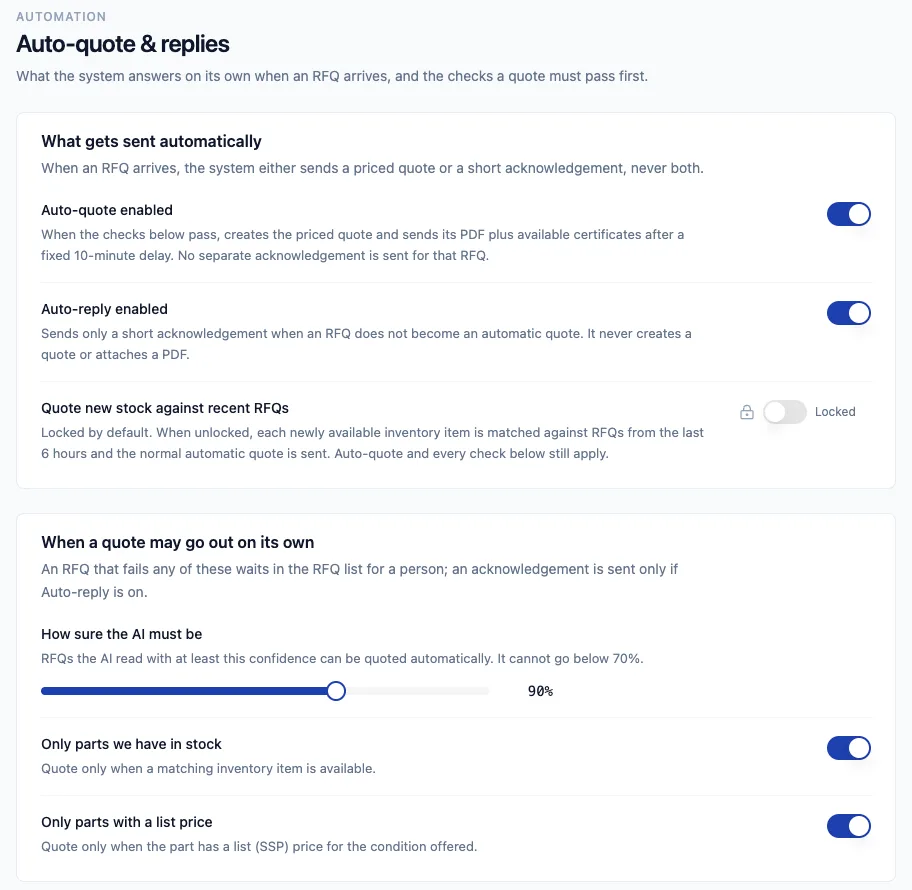
Its confidence must reach your threshold: 90% by default, and never below 70%.
The buyer is known
The sender is linked to a company in Fenavia and is not on your exclusion list.
The part is in stock
A matching unit exists and its status is available.
There is a list price
You have set a price for that condition. As-Removed, unserviceable and scrap stock are never priced automatically.
It is not a repeat
The RFQ is not already quoted, its quote-by date has not passed, and the buyer is not mid-negotiation with you.
A quote that passes every check is sent after a fixed 10-minute delay, from your own mailbox.
Where do you set the rules?
In Settings, under Auto-quote and replies. Each check is a switch or a slider, and the page explains what it does in plain words. Sender rules can block a sender, send them to review only, or queue them, and exclusions keep named buyers out of automatic quoting.
What happens to RFQs that fail a check?
They stay in the RFQ inbox for a person. If auto-reply is on, the buyer gets a short acknowledgement instead, never both a quote and an acknowledgement. Quiet hours and a limit on automatic replies per hour keep the mailbox from sending more than you expect.
How are marketplace RFQs quoted?
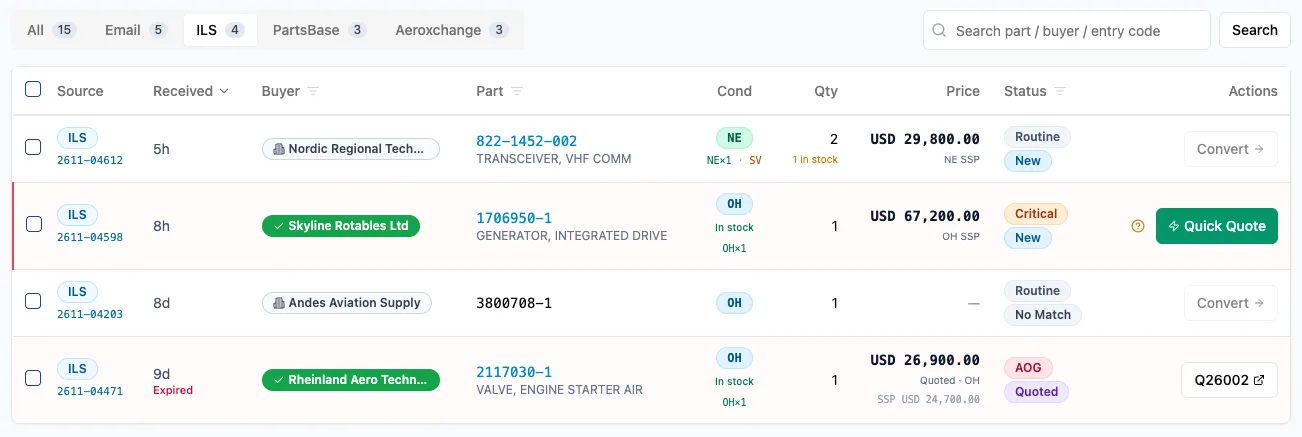
ILSmart, Aeroxchange and PartsBase RFQs are not quoted unattended. Each one shows a Quick Quote button when it is ready: one click emails the priced quote to the buyer from your mailbox, and you can select several RFQs and send them together.
Questions
Is AutoQuote switched on by default?
The setting starts on, but AutoQuote does nothing until a Microsoft 365 mailbox is connected. You can switch it off, raise the confidence threshold or add sender rules at any time in Settings, under Auto-quote and replies.
Does AutoQuote decide the price?
No. It quotes the list price you set for the part in that condition. If there is no list price, or the stock is As-Removed, unserviceable or scrap, the RFQ waits for your team.
What does the buyer receive?
A priced quote PDF, with the certificates you hold on that stock attached, sent from your own mailbox as a reply in the buyer's email thread.
Does AutoQuote answer ILSmart, Aeroxchange or PartsBase RFQs?
Not on its own. Marketplace RFQs are sent by a person with Quick Quote, one at a time or several together. An optional setting also quotes newly received stock against RFQs from the last six hours.
Can AutoQuote send two quotes into the same negotiation?
No. A reply in a thread you already answered, or the same buyer asking for the same part within 30 days, is held for a person.
See it with your own parts and RFQs.
A 30-minute call. Bring a sample of your stock list and a real RFQ.
Book a demo