
How does Fenavia import PartsBase RFQs?
Install Fenavia Sync
The same Chrome extension that handles ILSmart, paired with your workspace.
Sign in to PartsBase as usual
The extension adds a sync button to the PartsBase RFQ page.
Click sync
Your seller RFQs are read and sent to Fenavia.
Quote from the inbox
PartsBase RFQs appear under their own tab with the PartsBase RFQ number, matched to your stock.
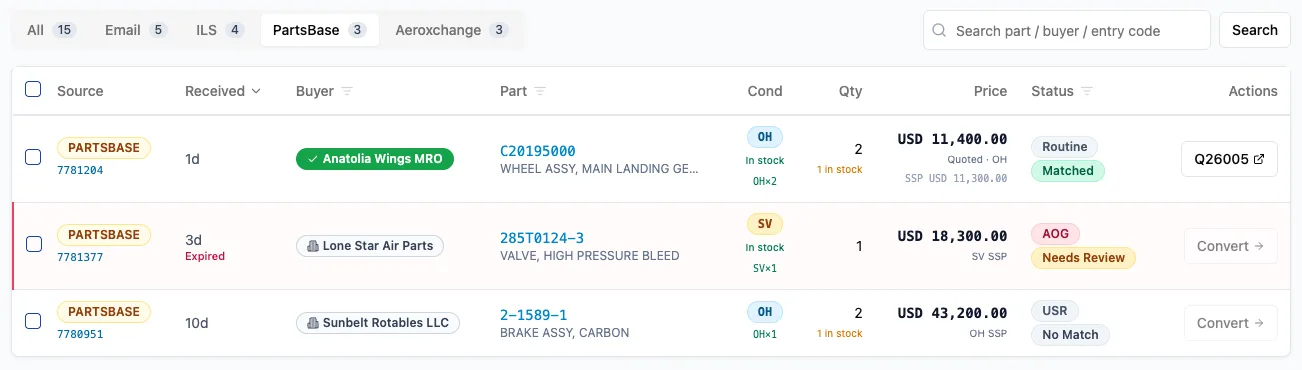
Each PartsBase RFQ is stored once, keyed on its RFQ number, part number and condition.
What else does Fenavia read from PartsBase?
Message Board
Wanted and For Sale posts are synced every 30 minutes while Chrome is open and you are signed in, and matched to your stock and open RFQs.
Your listings
Compare your PartsBase listings with your Fenavia stock and get ready-made files to bring them in line.
Fenavia works through your own marketplace accounts. It is not affiliated with, endorsed by or a partner of ILSmart, Aeroxchange or PartsBase. Product names belong to their owners.
Questions
Is this an official PartsBase integration?
No. Fenavia is not affiliated with or endorsed by PartsBase. The Fenavia Sync extension works inside your own signed-in PartsBase session.
Can I submit quotes into PartsBase from Fenavia?
No. Fenavia emails the quote to the buyer from your own Microsoft 365 mailbox.
Does Fenavia upload our stock to PartsBase?
Not automatically. The extension compares your PartsBase listings with your Fenavia stock and builds the add, update and delete files, which you upload on PartsBase's file loading page.
Can Fenavia read PartsBase RFQ emails?
Yes, as an option that is off by default. When it is on, an RFQ that arrives by email and through the extension is kept once.
See it with your own parts and RFQs.
A 30-minute call. Bring a sample of your stock list and a real RFQ.
Book a demo