
What happens during the move?
Send us your files
Your stock list, your customer and supplier list and any open orders, in whatever layout you use today.
We map the columns
Each column is matched to a field in Fenavia. Anything unclear, such as a mixed condition column, we ask about first.
We import and you check
We load the data into your workspace and go through a sample with you, unit by unit.
Connect your mailbox and marketplaces
A Microsoft 365 admin approves the mailbox, and the Fenavia Sync extension goes into Chrome for ILSmart and PartsBase. Aeroxchange is set up with our team.
Switch over
RFQs start arriving in the Fenavia inbox. From then on, stock changes happen in Fenavia.
Which columns does Fenavia need from my spreadsheet?
| Column | What Fenavia uses it for |
|---|---|
| Part number | Matching RFQs to stock and building the part's history in PN360 |
| Description | Quotes, orders and the ATA 106 form |
| Condition code | Matching the condition a buyer asks for (NE, NS, OH, SV, AR and others) |
| Serial number | Traceability, the ATA 106 form and the packing slip |
| Quantity and location | The stock match on each RFQ and where to pick the part |
| Cost and list price | Margins, and the list price per condition that AutoQuote quotes from |
| Obtained from / traceable to | ATA 106 field 13B |
| Consignor | Consigned stock and what is owed to the owner when it sells |
Missing columns are fine. A part number, condition and quantity are enough to start answering RFQs.
What should we tidy up before sending the file?
One row per serialised unit
Two serials of the same part on one row become two records.
One condition code per row
Use the codes you quote with, such as NE, OH or SV, rather than notes.
Part number on its own
Keep descriptions and remarks in their own columns.
Mark consigned stock
A consignor column is enough for us to set up consignment.
Nothing here is required. If the file is messy, send it anyway and we sort it out together.
What can our team import without us?
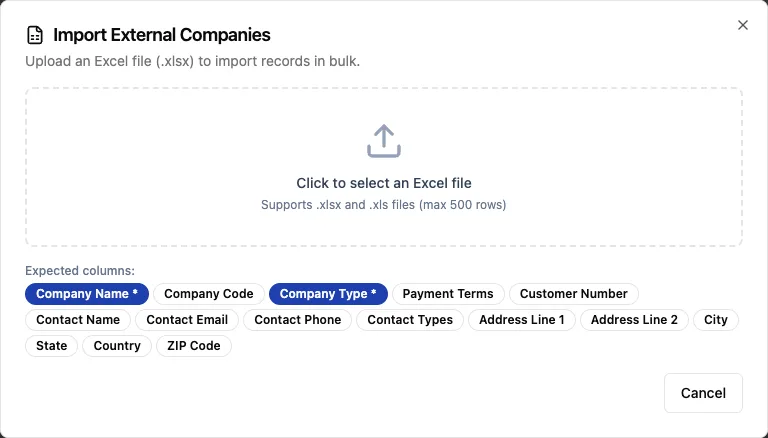
Companies and part numbers can be imported from an Excel file (.xlsx or .xls) at any time, up to 500 rows per file. The dialog lists the columns it expects.
Questions
Is there a setup fee for moving to Fenavia?
No. The Fenavia team does the import with you at no extra cost. The subscription is priced per company.
Can we import stock ourselves?
Not yet. The first stock import is done by the Fenavia team. After that, stock is added when you receive a purchase order or by hand. Companies and part numbers can be imported from Excel by your own team, up to 500 rows per file.
Do you bring in open orders as well as stock?
Yes. Stock, customer and supplier companies, and open orders are part of the move, and you check a sample with us before switching.
What happens to our spreadsheet after the move?
It stays yours. Most teams keep the last version as an archive and stop editing it once RFQs are answered from Fenavia.
See it with your own parts and RFQs.
A 30-minute call. Bring a sample of your stock list and a real RFQ.
Book a demo