
When does a parts spreadsheet stop working?
Usually when the RFQs pile up, more than when the stock list gets long. A few hundred lines in Excel are easy to search. Answering requests from ILSmart, Aeroxchange, PartsBase and Outlook against that file, several times an hour, is where it gets slow and mistakes creep in.
- The same unit is quoted to two buyers because the sheet was not updated.
- Nobody remembers what the part sold for last time, or who asked for it.
- Every shipment means typing the ATA 106 and packing slip again.
- Only one person knows which version of the file is current.
Every Fenavia customer so far ran their stock in spreadsheets before moving over.
How does a spreadsheet compare with Fenavia?
| Task | Fenavia | Spreadsheet and Outlook |
|---|---|---|
| Stock record | One record per unit with part number, serial, condition, location and status (available, reserved, sold) | Whatever columns the file has; status updated by hand |
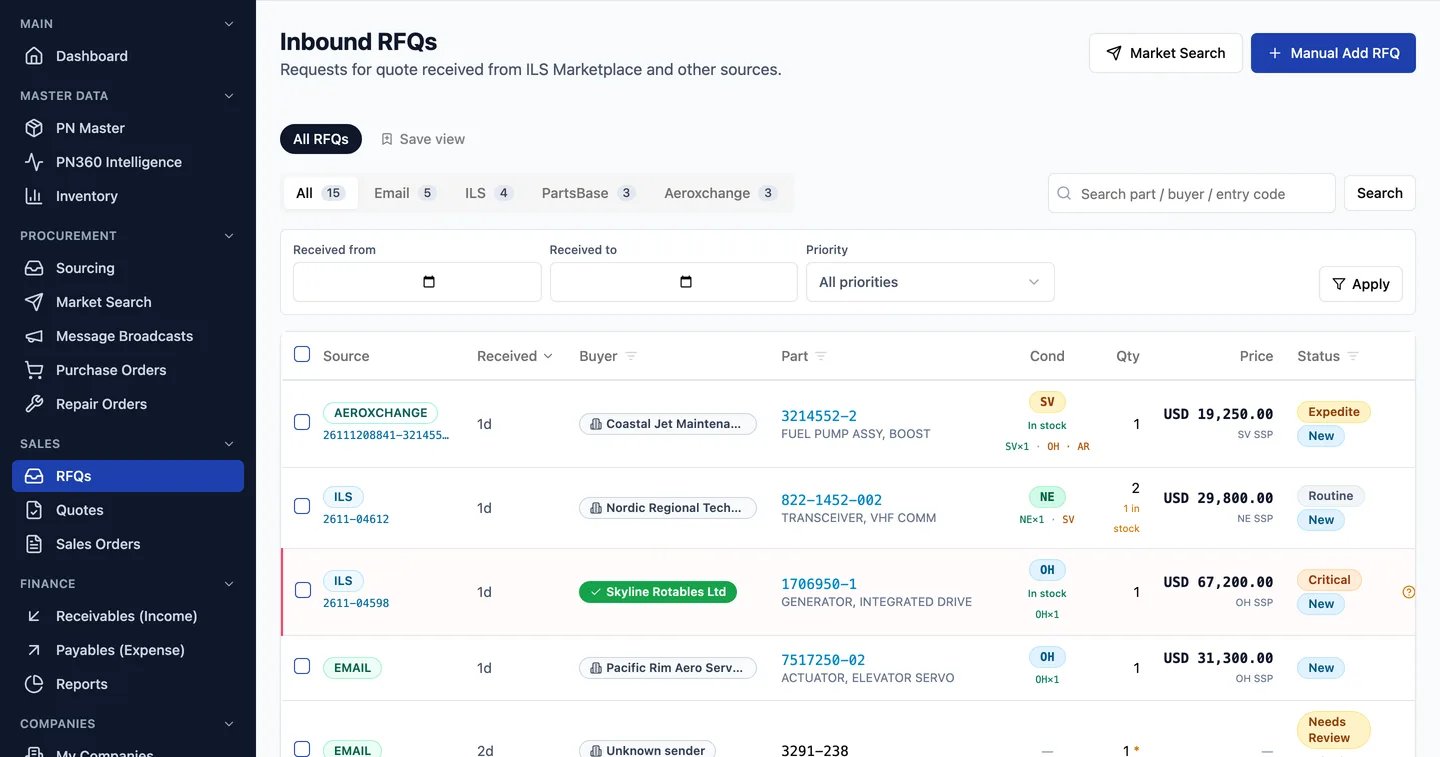
| Answering an RFQ | The RFQ opens with matching stock, the list price for that condition and who asked before | Search the file, check old emails, type the quote |
| Marketplace RFQs | ILSmart, Aeroxchange, PartsBase and email RFQs in one inbox | One browser tab per marketplace, plus Outlook |
| Quote to order | The quote converts to a sales order, the order to an invoice | Copied into a new file or template |
| Paperwork | ATA 106, certificate of conformity and packing slip generated from the order | Filled in again for each shipment |
| Part history | PN360 shows past RFQs, quotes, orders and supplier offers for a part number | Spread across files and email threads |
| Who changed what | Activity log and status history on stock and orders | File version history, if it is switched on |
| Access | Roles, permissions, an own-records-only option and authenticator-app sign-in | Anyone who has the file |
The spreadsheet column describes a typical Excel and Outlook setup.
What stays the same after the move?
Your marketplace accounts
Fenavia works through your own ILSmart, Aeroxchange and PartsBase logins.
Your email address
Quotes and invoices go out from your Microsoft 365 mailbox.
Your part data
Part numbers, serials and condition codes such as NE, OH, SV and AR come across as they are.
Your spreadsheet
It stays yours. Keep it as an archive after the switch.
When is a spreadsheet still enough?
If one or two people handle a few RFQs a week, sell from a short list and rarely ship with ATA 106 paperwork, a well-kept spreadsheet is fine and cheaper. Software starts to make sense when RFQs come from several marketplaces at once, more than one person quotes, and most sales ship with documents.
Fenavia is priced per company, with no setup fee, and the import is done for you.
Questions
Can Fenavia import our Excel stock list?
Yes. The Fenavia team imports it for you: send the spreadsheet, we map your columns, load stock, companies and open orders, and check the result with you before you switch. Your team can also import companies and part numbers from Excel themselves, up to 500 rows per file.
Do we need an ERP as well as Fenavia?
No. Fenavia holds stock, quotes, sales, purchase and repair orders, invoices and documents itself. It does not connect to other ERP systems.
Will our marketplace accounts and email address change?
No. Fenavia works through your own ILSmart, Aeroxchange and PartsBase accounts, and quotes go out from your own Microsoft 365 mailbox.
How much does it cost to move off spreadsheets?
There is no setup fee and the import is done by the Fenavia team. The subscription is priced per company; book a demo for a quote.
See it with your own parts and RFQs.
A 30-minute call. Bring a sample of your stock list and a real RFQ.
Book a demo